
Divi Notes brings feedback, conversations, and assigned tasks directly into Divi 5. Attach a note to an element, discuss the change with your team, and resolve it when the work is complete. 🎉 It’ s also a great way to leave contextual notes for yourself so you never forget…
Page-Wide Copy And SEO Improvements Using Divi AI Agents

A vague headline or a generic “Learn More” button can leave visitors unsure what you offer. With Divi AI Agents in Divi 5, you can revise headlines, service descriptions, and calls to action across a page from one conversation. Choose a search topic that matches your offer, then…
10 Commands You Need To Add To Your Divi AI Agents Command Library

Building a website often means repeating the same instructions across different pages. We ask for sections that match existing styles, revisions that preserve approved content, and layout checks before a client review. With Divi AI Agent Commands, we can save those instructions and reuse them whenever the same…
Welcome Drip and Sleeknote to the WPBeginner Family of Products
Today, I’ m extremely excited to share that Drip and Sleeknote are joining the Awesome Motive network, and they’ re now part of the WPBeginner family of products. Drip is an email marketing and automation platform designed for small businesses, from content creators to online stores. More… Read More » The…
Everything You Need To Know About Divi 5’s Multi-Select And Bulk Editing
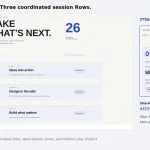
Editing repeated elements individually takes time, especially when they need the same design adjustments. Divi 5’s Multi-Select and Bulk Editing let us select several elements, change their settings together, and apply actions to the selection. We’ll explain how selection works, what Mixed values mean, and how bulk settings…
10 Ways To Work Faster With Divi AI Agents

Repeated edits can slow down a Divi build: matching button styles, correcting placeholder copy, checking phone spacing, and opening module after module to make the same change. Divi AI Agents let you describe those changes in the Divi 5 Visual Builder and apply them across the relevant elements….
7 Best WordPress MCP Servers and Plugins in 2026 (We Tested Them All)
Connecting Claude or ChatGPT to your WordPress site can save you hours of routine admin work. However, the AI can only do what your WordPress MCP server lets it do, and some servers will permanently delete content without asking you first. I wanted to know… Read More » The…
5 Free Loop Filter Sidebar Designs For Divi 5

A useful filter sidebar gives visitors clear choices without taking over the page. This free pack includes five styled Post Filter sidebars for Divi 5, each paired with a matching content loop. Import a section and adapt its controls to the way people browse your content. The designs…
What Is LLMS.txt And Does Your Website Need One?
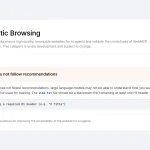
You ran your site through PageSpeed Insights, and something unfamiliar appeared in the report: a line about a file named llms.txt. Your site doesn’ t have one. Is that a problem? You go looking and land on Google’ s own Search documentation, which says you don’ t need one to appear…
Vulnerability & Patch Roundup — October 2026

If you operate a website, you’re already aware that a single unpatched vulnerability can render your site inaccessible, compromise your reputation, or necessitate extensive remediation following an attack. Most security breaches we observe originate from automated attacks that exploit known software vulnerabilities, often the same ones that have…
How To Build A Product Grid With Divi 5’s CSS Grid Editor

Give one product room to stand out, then let the rest of the collection fill the grid around it. Using Divi 5‘ s CSS Grid Editor, you’ ll build an outdoor gear layout whose first card spans two columns. Large photos and compact price badges carry the design from four…
WPBeginner Spotlight 29: WPVibe Passes 100,000 Users, OptinMonster MCP, and an Urgent PHP Fix
October was the month AI assistants stopped being a side feature in WordPress. You can now ask Claude or ChatGPT to build a popup, set up a donation automation, or find out why a scheduled task failed. Before you read the rest, please check your… Read More » The…
How to Fix Failed WordPress Automatic Updates (Step by Step)

Seeing the message " An automated WordPress update has failed to complete" in your WordPress dashboard can be worrying, especially if you’ re unsure whether the update has affected your website. WordPress normally handles many updates automatically, but sometimes something goes wrong during the process. The problem could be as…
Creating A Design System From A Screenshot with Divi AI Agents

A screenshot gives you a visual direction, but turning it into a reusable website takes more than matching colors and spacing. You need shared values for typography and sizing, plus reusable styles that keep later pages consistent. With Divi AI Agents in Divi 5, you can use a…
Why Git Matters for WordPress Development (Infographic)
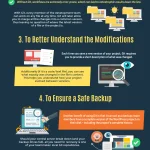
When I first started working with WordPress, I joined a digital marketing agency with a small development team. On my first day, a colleague introduced me to Git. I’ d never used the command line before, and initially Git seemed complicated. But my colleague explained that I could get…
Creating Custom SVGs with Divi AI Agents

Divi AI Agents can create custom SVG graphics from plain-language instructions. Describe an icon, divider, or badge, specify its style and colors, and ask the agent to add it to your layout as an editable SVG Module. In this tutorial, we’ll create a decorative leaf, refine it in…
WordPress Ecommerce Security: What 106 ecommerce-site respondents told us

WordPress ecommerce websites have a different security profile from many other types of websites. An attack can interrupt transactions, affect customer data, damage trust, and directly interfere with revenue. That makes ecommerce an interesting group from our 2026 WordPress security survey to dive deeper into. Of the 319…
Components Inside Of Components Using Slots

A resource section can share one introduction across several pages while presenting different content beneath it. Reusing both the section and its cards lets you maintain those designs separately. With Components and Slots in Divi 5, you can combine those two levels of reuse. Put a card Component…
Nested Variables, Variable Math & Variable Combinations for Divi 5

I’ m excited to introduce a new level of flexibility for Divi 5 variables: combine them, nest them within other variables, and use them directly in calculations within your settings. 🎉 Create spacing relationships that stay connected as your design changes. Build fluid sizes from shared minimum and maximum…
Best Practices For Steering Divi AI Agents To Get It To Do What You Want

Divi 5 has a new way to build pages in the Visual Builder: Divi AI agents. Instead of working through settings panels one change at a time, you describe what you want in a conversation, and the agent carries it out on the page. It can add modules, …
