
Divi 5 is officially here, and while the performance boost is huge, we know you are likely wondering what this means for your current website. Migrating existing sites can feel daunting or unreliable, but the Backward Compatibility System is designed to solve this. It checks and converts your…
Elegant Themes
Mastering Divi 5’s Design System: How To Approach New Builds

Divi 5 is the biggest evolution in the history of Divi. It is a complete rebuild focused on performance, modern accessibility, and a powerful no-code design system. The result is a platform that lets anyone create consistent, scalable websites faster and more efficiently. Divi 5’ s new modular framework…
🎉 Divi 5 Launch Gift: A Free Design System (Download Now!)

The official launch of Divi 5 is here, and we’re celebrating with a free, production-ready Design System you can import into any new Divi 5 site. This Design System is built to show how Divi 5’s modern design infrastructure fits together in a real project. It includes hundreds…
Divi 5 Official 🎉 (Beta Ends Today)

After over a year of public testing and improvement, Divi 5 is officially exiting the beta phase today. This isn’ t the finish line; it’ s a fresh start for Divi, and you can expect even faster development moving forward. It’ s going to be an exciting year! I cover everything…
Configuring Optimal Semantic Tags In Divi 5’s Default Presets

Skipping the process of assigning semantic wrappers can feel tempting. It often means building the page first, then going back to configure tags for each element, and repeating that work on every new section or page. Divi 5 removes this friction by using presets. You can define semantic…
How To Create Browser-Native Toggles Using Divi 5’s Semantic Tags
Accordions and toggle content have traditionally required JavaScript to handle the interaction correctly. Modern HTML includes native elements that get you closer to a non-JavaScript version of that. < details> and < summary> elements create functional disclosure widgets using nothing but a couple of simple elements. These elements handle expand/collapse…
How To Use Interactions, Canvases, And Portals Together (The Complete Workflow)
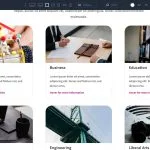
Canvases were recently introduced in Divi 5, providing detached workspaces for building off-canvas menus, staging areas, modal popups, and more. Combine these Canvases with Interactions, and you have a complete system for controlling exactly how information flows while making your website interactive. That includes click triggers, scroll reveals, …
How Import & Export Presets In Divi 5

Presets are how you stop rebuilding the same design choices over and over in Divi 5. Once you’ve defined your buttons, text styles, or card layouts, the real advantage is being able to move those decisions into new projects instead of starting from zero. Divi 5 lets you…
How To Import & Export Design Variables In Divi 5

Design systems cut down the repeated work in website design. They give you a predefined set of design decisions for color palettes, spacing scales, typography, and more. Divi 5 introduced Design Variables in April 2025, letting you define these values globally. If you’re a web designer or you…
Introducing Speculative Prerendering For Divi 5
We implemented speculative prerendering to speed up load times in the builder, and the results are going to blow you away. We want the Divi 5 building experience to be fast, faster than any other builder. The only thing faster than fast is instant, and with speculative prerendering, …
Buttons vs Links: When To Use Each In Divi 5 (With Practical Examples)

Your site is full of things people can click. Menus, buttons, icons, banners, and form submits. They can look identical, but the HTML underneath tells browsers, screen readers, and search engines what each element actually is. With Divi 5, you can control that meaning directly in the builder…
Exploring Divi 5’s New Top Bar UI
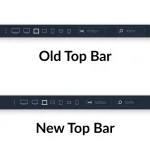
The top navigation bar sits at the center of everything you do in Divi. So even small changes to how it’ s organized can shift the entire editing experience. As Divi 5 brought in more tools and shortcuts, the top bar started carrying too much at once. Finding something…
Divi 5 Public Beta 9 Release Notes

The Divi 5 Public Beta is available today. If you prefer the experience to Divi 4, it’ s ready for use. If you use Divi 5, you’ ll notice an update notification for Public Beta 9. We release new Divi 5 versions every two weeks, and each one improves upon…
How To Create An Off Canvas Services Popup In Divi 5
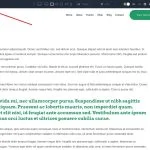
Off canvas menus appear everywhere on the web, but building one that works smoothly on desktop often means fighting with custom CSS or patching together mega-menu workarounds. Divi 5 handles this differently with Canvases and Interactions. We’ ll build a global off canvas services menu triggered from a Theme…
When To Use Section, Aside, And Main HTML Elements In Divi 5
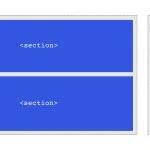
Search engines and assistive technologies rely heavily on your page’s HTML structure to understand what each part is for. When everything is wrapped in generic < div> elements, they get less structural context, which can make your content harder to interpret and navigate. Using < main> , < section> , and < aside> can…
Using Divi 5’s Flexbox Layout System For Responsive Web Design

Responsive design often comes down to controlling how elements shift, wrap, and space themselves across different screens. Divi 5 introduces Flexbox as its core layout system, giving you control over layout flow and alignment at the container level. While block-style layouts lock you into fixed columns and floats, …
Introducing The Divi 5 Command Center
I am excited to announce the release of the Command Center for Divi 5. Mastering it feels like unlocking a superpower, giving the term’ power user’ true meaning. You can quickly execute commands such as adding elements, navigating your website, jumping to specific settings, opening panels, and more….
When To Use Figure and Figcaption HTML Elements In Divi 5
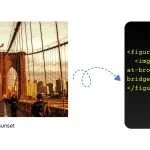
Most images on your site need nothing more than what Divi already does. Add an Image Module, style it, and you’ re done. But there are times when you want to group an image with a caption in a way that your HTML explicitly defines as a single unit….
New Menu Modules, Menu Looping and Interactions
Today, we are introducing new menu components, menu looping, and selector-based targeting and breakpoint triggers to the interaction builder. These new features, along with Divi 5’s broader systems like canvases and semantic elements, all come together to give you the freedom to build any type of menu, including…
When To Use Header And Footer HTML Elements In Divi 5

Header and footer elements are commonly understood as page-level structure. A site has one header, one footer, and the rest of the layout lives in between. Most people stop there. In HTML5, though, < header> and < footer> go further. They can describe structure within individual sections of content, beyond…
