
Divi 5 makes it easy to build split screen layouts that feel modern, clear, and professional. In this free pack, you will get 5 Split Screen Sections, each designed to pair content and imagery side by side for immediate visual impact. Drop one onto any page, swap the…
Elegant Themes
How To Create Hotspots With Divi 5
Clickable areas, such as hotspots on your website, can reveal hidden content, trigger pop-ups, or launch animations, transforming static pages into interactive elements that guide people precisely where you want them to go. Divi 5‘ s Interactions handles all of this without requiring any custom coding. We’ ll walk through…
5 Color Palettes For Balanced Web Design In 2026
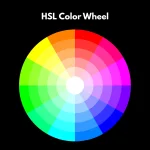
Choosing colors with hex codes means guessing your way through lighter versions, darker buttons, and accessibility fixes. Divi 5 introduces a redesigned Color Picker with HSL controls to its new Color System, allowing you to build and scale palettes with ease. You can create lighter or darker accents…
Testing DiviFlash With Divi 5

Another Divi Community staple is preparing for the next chapter. DiviFlash has been a cornerstone extension for Divi users who need more than the native modules can offer, and their team has been working diligently on Divi 5 compatibility. Divi 5 is an architectural overhaul of the builder, …
How To Create Interactive Layouts On Scroll With Divi 5

Capturing user attention requires more than static designs. Modern websites thrive on engaging, dynamic experiences that unfold as users scroll Divi 5‘ s new Interactions feature allows designers to build scroll-triggered effects and animations that transform passive pages into captivating stories, guiding visitors through seamless interactions. In this post, …
How To Build A Sticky Sidebar Layout With CSS Grid In Divi 5
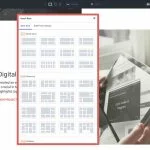
With Divi 5, CSS Grid is built into the Visual Builder, so you can create true two-dimensional layouts using rows and columns together without touching a stylesheet. That makes sticky sidebar layouts much easier to build, especially when it is time to make them responsive. In this post, …
The Ultimate Guide To Presets In Divi 5 (Including New Features)
Divi 5 helps you remember and reuse your design decisions. Using presets, you can set your brand colors, button styles, heading sizes, and spacing once, and every new element you add can automatically follow those rules. This transforms your styling into a reusable system that maintains consistency without…
5 Hotspot Designs For Divi 5 (Free Download!)
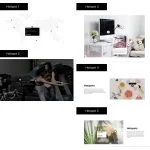
Divi 5 makes it simple to build interactive sections that feel intentional, balanced, and on brand. In this free pack, you will get 5 Hotspot Sections, each designed to highlight key locations, features, or details in a clean and engaging way. Drop one onto any page, swap the…
Divi 5 Public Beta 5 Release Notes

The Divi 5 Public Beta is available today. If you prefer the experience to Divi 4, it’ s ready for use. If you use Divi 5, you’ ll notice an update notification for Public Beta 5. We release new Divi 5 versions every two weeks, and each one improves upon…
Introducing Divi Canvases (Off-Canvas Menus, Popups & Canvas Portals 🤯)

I am excited to introduce Divi Canvases for Divi 5. A canvas is a workspace detached from your main post content. You can use them as staging areas for design updates, a place to organize off-canvas components, or simply as a safe space to experiment with new ideas….
How To Create Nested FAQs With Divi 5’s Nested Modules

Visitors scan FAQ sections more than they read them. They skim headings, looking for the one question that matches their problem. When they can’ t find it fast, it affects conversions. The solution doesn’t lie in writing better answers, but in better organization. So, in this post, we’ ll show…
How To Create Custom Product Pages In Divi 5 (New Woo Modules)

When it comes to ecommerce, standing out means ditching cookie-cutter templates for product pages that not only captivate but also convert. With Divi 5‘ s Woo Product Modules, you can build high-impact product pages entirely from scratch, all while seamlessly integrating real-time WooCommerce data. In this post, we’ ll walk…
How To Create A Custom Post Type Carousel Loop In Divi 5
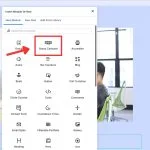
Post displays keep visitors engaged with your content. They showcase what matters and encourage people to explore further. Static post loops work fine, but sometimes require an extra element to capture attention. That’ s where carousels come in; they add movement that actually makes people stop and engage. In…
How To Transition From Block To Flex In Divi 5

For years, Divi users relied on a block-based layout system that worked well at the time, but as WordPress page builders have evolved, limitations have emerged. Columns stacked predictably in rows, mobile reordering required duplicate sections or custom CSS, and achieving perfect vertical centering felt like a battle….
5 Large Text Designs For Divi 5 (Free Download!)

Divi 5 makes it simple to build bold hero sections and headline areas that feel intentional, balanced, and on brand. In this free pack, you’ ll get 5 styled Large Text Sections — each crafted with strong typography, clear hierarchy, and flexible layouts so you can plug in your…
How To Design CSS Grid Layouts For Your Website
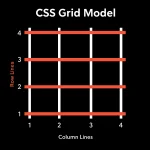
Building a CSS Grid layout isn’ t difficult to understand, but it can be challenging to execute cleanly. Sketching columns is easy. Keeping spans, gaps, and breakpoints in sync across pages is where most people stall. The good news: there are several ways to build real grids. You can…
How To Build Semantic Color Roles With Relative HSL In Divi 5 (Primary/Info/Warning)
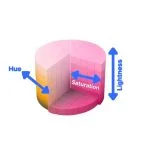
Managing dozens of color variations across a design system creates unnecessary chaos. You might spend hours adjusting tints and shades instead of building the actual website. However, there’ s a way to build colors that are flexible, consistent, and easy to maintain: with Hue, Saturation, Lightness (HSL)-based colors. Divi…
How To Create Nested Grids In Divi 5

Divi 5 offers Flexbox, Nested Rows, and CSS Grid, which, when combined, build a stunning structure that stays responsive all the time. You can create a parent grid for your main structure, then build smaller grids inside its columns to organize content with real control. In this post, we’ ll show…
How To Run A Pre-Launch Design QA With Divi 5’s Inspector

Before you publish a landing page, you scroll through one more time to check if everything looks right. But spacing that doesn’ t match, incorrect colors, or different fonts can slip right past you. Divi 5’ s Inspector tool solves this by displaying all your design changes in one place, …
How To Create Hover, Focus, And Active States With HSL-Based Variables In Divi 5
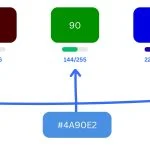
Building interactive elements that look good across every user action takes more effort than it should. You set up a button’ s default appearance, then manually create variations for when someone hovers over it. Each state needs its own color, and each color requires its shades. Keeping them all…
